Visit Japan Web: What to register and how arrival works

Verdict
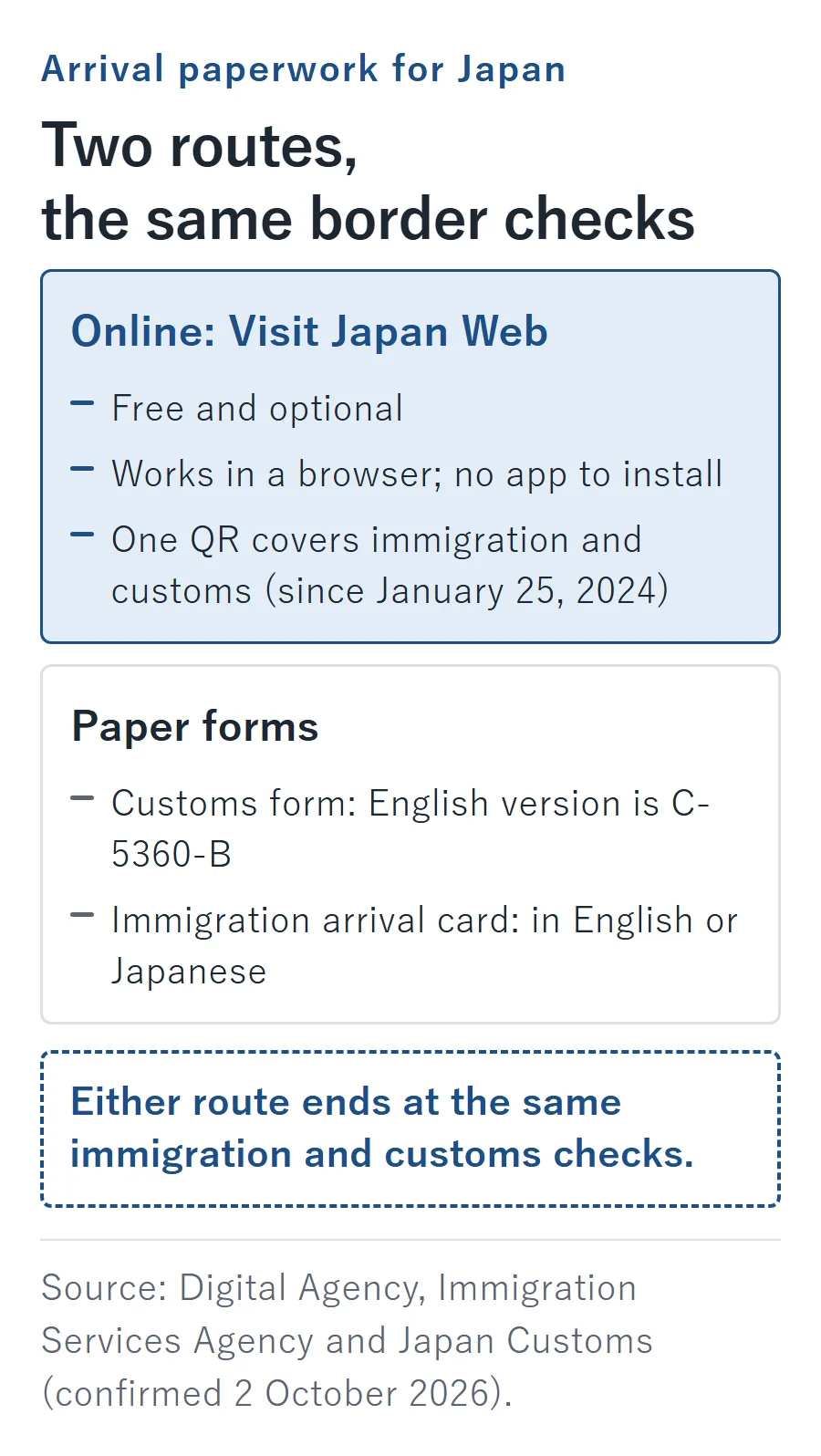
Use Visit Japan Web before flying if you want to handle your arrival paperwork online. As of October 2026, the Digital Agency, Immigration Services Agency and Japan Customs recommend this optional, free service, which works in a browser without an app. Paper immigration and customs forms remain accepted, so choose paper if that is easier for you to complete correctly.
Source: Digital Agency – Visit Japan Web, Immigration Services Agency – arrival records and Japan Customs – declaration options (confirmed 2 October 2026).
What is Visit Japan Web, and what does it not replace?
Visit Japan Web is the Digital Agency’s browser-based service for preparing arrival information and generating a code to present during border procedures. Start at the official Visit Japan Web website, rather than a search advertisement or a commercial QR generator.
You can fill in the information on a computer, but you need a phone or a tablet to present the code. Decide which device you will carry through arrival before treating registration as finished.
Source: Digital Agency – service overview (confirmed 2 October 2026).
There is no official app to install. The Digital Agency’s warning about look-alike downloads makes that distinction explicit:
This service does not provide any apps.
Source: Digital Agency – suspicious app warning (confirmed 2 October 2026).
The website handles paperwork, not admission decisions. An immigration officer still examines your entry, and Customs retains the ability to inspect your belongings; having a QR is not permission to bypass either agency.
Source: Immigration Services Agency – arrival records and Japan Customs – electronic gates (confirmed 2 October 2026).
What should you register before you fly?
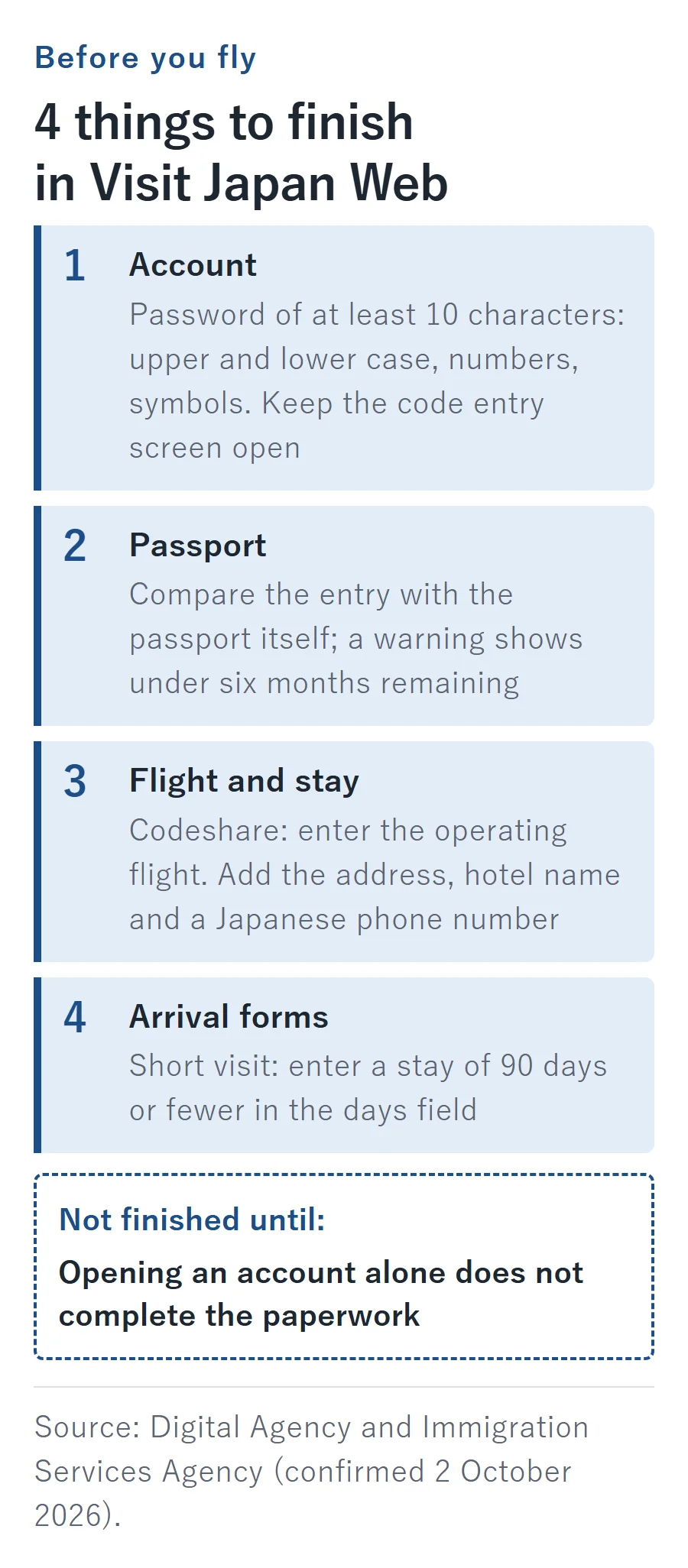
Gather your passport and flight ticket, plus access to your email and the details of your stay in Japan. Work through the traveler record, trip record and arrival forms: opening an account alone does not complete the paperwork.
Source: Digital Agency – service overview and registration guide (confirmed 2 October 2026).
How do you get through account setup?
Register with your email and choose a password of at least 10 characters containing uppercase letters, lowercase letters, numbers and symbols. Enter the verification code sent to your email without closing its entry screen: closing that screen invalidates the code and means restarting that process.
Source: Digital Agency – instruction manual (confirmed 2 October 2026).
Keep the form open while retrieving the email. This is an account-setup detail worth settling at home rather than discovering while trying to organize everyone’s documents at the airport.
What should you verify in the passport record?
Choose camera capture or manual entry, then compare the resulting information with the passport itself. Visit Japan Web displays a warning when the passport has less than six months remaining; treat that as an on-screen alert, not a decision on your admission.
Source: Digital Agency – registration guide (confirmed 2 October 2026).
Which flight and accommodation details belong in the form?
Enter the arrival date, airline and flight information for the journey. For connecting flights, use the connection-entry option; for a codeshare, enter the operating flight, rather than treating the marketing flight number as interchangeable.
Source: Digital Agency – registration guide and instruction manual (confirmed 2 October 2026).
The accommodation screen includes the postal code, prefecture, municipality, street address, hotel name and a Japanese telephone number. Address fields accept Latin letters, digits and permitted punctuation, so prepare the address in that form instead of relying only on a Japanese-language booking screenshot.
Source: Digital Agency – instruction manual (confirmed 2 October 2026).
What deserves attention before completing the arrival forms?
Finish the combined immigration-and-customs section for your trip, not just its flight details. The Immigration Services Agency specifically warns about mistakes in the stay-length field: applicants seeking a short visit for tourism, business or visiting relatives should enter the intended stay of 90 days or fewer in the days field.
Source: Immigration Services Agency – arrival records and Digital Agency – registration guide (confirmed 2 October 2026).
Read the unit beside the field before entering the number. This is a data-entry instruction, not a promise about the period of stay you personally receive. The agency asks travelers to finish entering their information before reaching the immigration examination area; preparing it before the flight avoids leaving that job for arrival.
Source: Immigration Services Agency – arrival records (confirmed 2 October 2026).
The health-question section is different: its answers are not saved. Do not confuse answering those questions with completing the immigration-and-customs record for your trip.
Source: Digital Agency – registration guide (confirmed 2 October 2026).
Is Visit Japan Web mandatory, or can you use paper?
Visit Japan Web is optional; the underlying declarations are not. Customs requires an arrival declaration from everyone entering Japan, while newly entering foreign visitors must also submit an immigration arrival record.
Source: Japan Customs – passenger clearance and Immigration Services Agency – arrival records (confirmed 2 October 2026).
For the paper route, distinguish the documents:
- Customs form: obtain it on an aircraft, ship or at Customs, or print it beforehand on A4 paper; the English version is form C-5360-B.
- Immigration arrival card: the agency directs travelers who find smartphone procedures difficult to use paper, completed in English or Japanese.
Source: Japan Customs – passenger clearance, declaration options and Immigration Services Agency – arrival records (confirmed 2 October 2026).
Choose the method you can complete accurately. A missing QR is not the same thing as missing permission to enter, nor does using paper remove the need for the applicable forms and checks.
Can the same QR cover immigration and customs?
Yes: one Visit Japan Web QR serves both border procedures for a foreign visitor. The combined-code system took effect on January 25, 2024, replacing the separate immigration and customs codes.
Source: Digital Agency – unified arrival codes (confirmed 2 October 2026).
Codes generated before that change are no longer usable, and neither are codes from the former Customs Declaration App. Start with the current trip’s arrival record instead of an old image saved from an earlier holiday.
Source: Digital Agency – unified arrival codes and Japan Customs – electronic declaration notice (confirmed 2 October 2026).
Can you use screenshots or display the arrival QR offline?
Screenshots are accepted for the immigration-and-customs QR, including at joint kiosks. The Immigration Services Agency states this on its arrival-record and joint-kiosk pages; their guidance is in Japanese.
Source: Immigration Services Agency – arrival records and joint-kiosk notice (confirmed 2 October 2026).
If you correct registered details, generate the QR again and replace the saved screenshot. Keep the image and the underlying record synchronized rather than assuming an older image reflects a later edit.
Source: Immigration Services Agency – arrival records (confirmed 2 October 2026).
For offline display inside the service, sign in while online and remain signed in. Editing accompanying-family information still needs connectivity, as do functions other than the offline arrival-code display; the official FAQ points travelers to free airport Wi-Fi.
Source: Digital Agency – Visit Japan Web FAQ (confirmed 2 October 2026).
The separate Tax-free QR belongs to shopping, and the Digital Agency’s screenshot prohibition applies to that code, not the arrival code; the Japan tax-free shopping and departure guide covers that separate process.
Source: Digital Agency – registration and shopping guide (confirmed 2 October 2026).
Make the backup before disconnecting: open the intended trip, inspect the details, save the updated arrival code and keep the login active. For data on landing, use the Japan eSIM plan comparison; for a shared-device decision, read the pocket WiFi versus eSIM guide.
How should families and returning residents register?
A representative can add up to 10 accompanying relatives who complete their border formalities together, but each traveler needs an individually generated QR, presented separately. The normal arrangement is a personal account for each user, and an email address cannot be used to create multiple accounts.
Source: Digital Agency – Visit Japan Web FAQ, instruction manual and Immigration Services Agency – arrival records (confirmed 2 October 2026).
The representative can select the option to declare for accompanying relatives together, reducing some repeated customs input. That convenience does not turn the family’s separate codes into a group admission pass: organize the passport and code for each person together.
Source: Digital Agency – instruction manual (confirmed 2 October 2026).
Returning Japanese nationals and foreign residents holding re-entry permission register customs information only, rather than a foreign visitor’s arrival record. The electronic foreign-arrival record also excludes special-landing and SOFA cases; do not force a returning-resident journey through the new-visitor workflow.
Source: Digital Agency – registration guide and Immigration Services Agency – arrival records (confirmed 2 October 2026).
What happens at the airport?
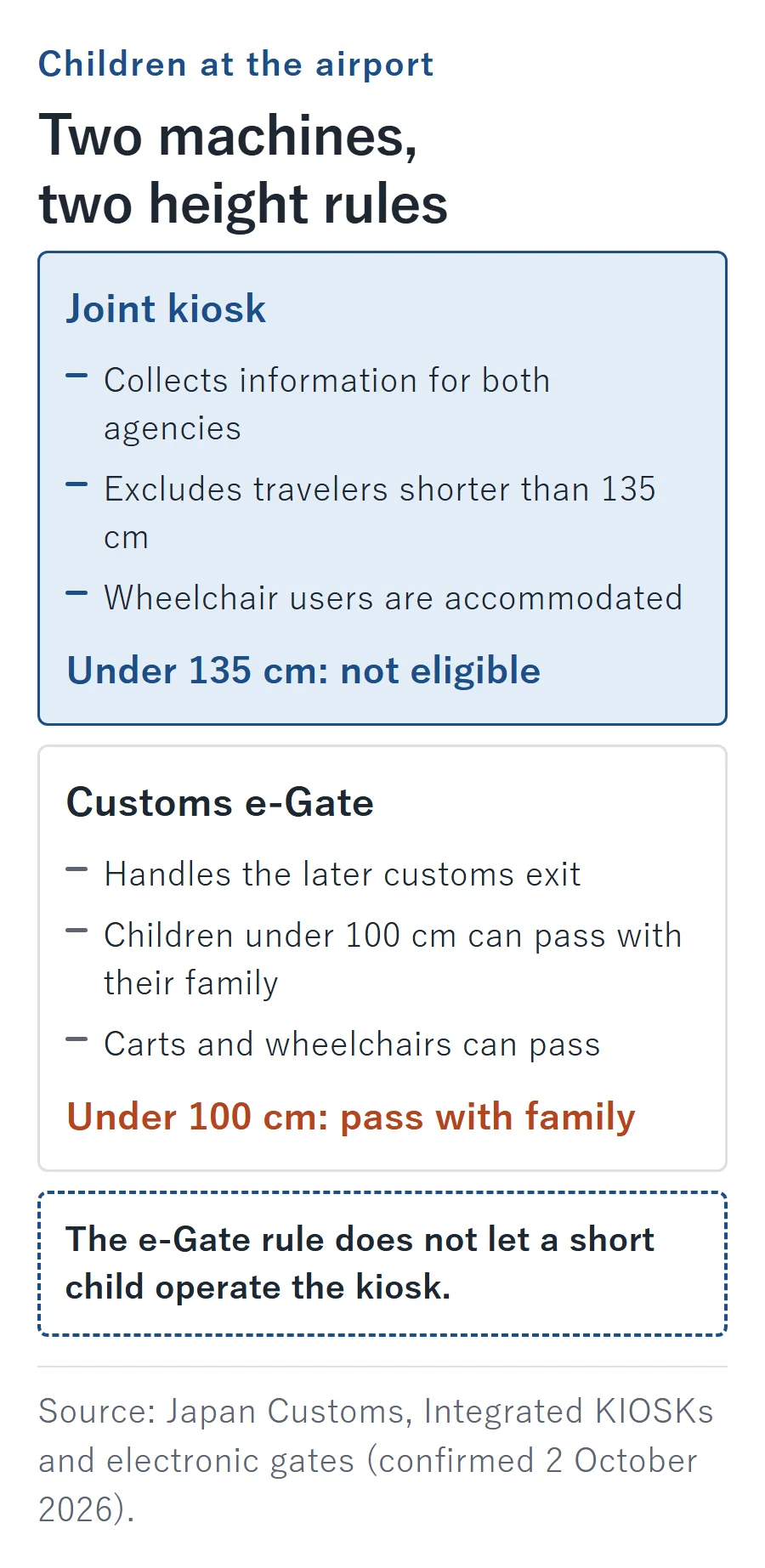
Follow the route for your terminal and the instructions after each check. A joint kiosk collects information for both agencies; a customs e-Gate handles the later customs exit, so these are not interchangeable machines.
Source: Japan Customs – Integrated KIOSKs and electronic gates (confirmed 2 October 2026).
Which terminals have joint kiosks?
As of October 2026, the Immigration Services Agency lists the following terminal coverage and hours; Fukuoka also has joint kiosks. Operating hours are subject to change with flight schedules, so the list is not a promise of access on a particular arrival.
| Airport | Terminal | Listed operating hours |
|---|---|---|
| Kansai | 1 | 08:00–22:00 |
| Kansai | 2 | 09:00–21:00 |
| Haneda | 2 | 04:30–23:30 |
| Haneda | 3 | 24 hours |
| Narita | 1, 2 and 3 | 07:00–21:30 |
Source: Immigration Services Agency – joint-kiosk notice (confirmed 2 October 2026).
At a joint kiosk, scan the arrival code and passport, then follow the photo instructions; foreign visitors also provide fingerprints. Remove masks and sunglasses for the photo. The machine displays a routing letter, a through d, which tells you where to go next.
Source: Japan Customs – Integrated KIOSKs (confirmed 2 October 2026).
Foreign visitors then undergo immigration examination at booths assigned to kiosk users. When Customs determines an inspection is unnecessary, the onward route uses a facial-recognition gate; declaring excess goods or unaccompanied baggage can instead lead to a customs counter.
Source: Japan Customs – Integrated KIOSKs (confirmed 2 October 2026).
Joint kiosks exclude travelers shorter than 135 cm, but accommodate wheelchair users. A passport without an electronic chip can be used at the kiosk, but it cannot support the facial-matching customs e-Gate route.
Source: Japan Customs – Integrated KIOSKs (confirmed 2 October 2026).
What if you use an immigration counter and a separate customs terminal?
Show your arrival QR during immigration examination, then use a Customs terminal or staffed inspection point. At some airports, you can complete the electronic customs step while waiting for checked luggage.
Source: Digital Agency – arrival guide and Japan Customs – electronic gates (confirmed 2 October 2026).
As of October 2026, customs e-Gates are available at New Chitose, Narita, Haneda, Chubu Centrair, Kansai, Fukuoka and Naha, and the list is subject to change. They require a chip-equipped passport, and electronic declaration does not rule out a baggage inspection.
Source: Japan Customs – electronic gates (confirmed 2 October 2026).
For the customs e-Gate, children under 100 cm can pass with their family; carts and wheelchairs can also pass through. This is separate from the joint kiosk’s height restriction, not an exception allowing a short child to operate that kiosk.
Source: Japan Customs – electronic gates and Integrated KIOSKs (confirmed 2 October 2026).
Once arrival formalities are finished, keep onward luggage arrangements as a separate planning task. The luggage-forwarding guide for Japan covers sending a suitcase onward rather than the border declaration itself.
What must you declare to Customs?
Submit the customs form even if everything you carry fits within the allowances. Separate the goods you are bringing into Japan from the money or monetary instruments that trigger an additional declaration.
Source: Japan Customs – passenger clearance (confirmed 2 October 2026).
These arrival allowances per adult are as of October 2026; they concern goods brought into Japan, not purchases made later during the trip.
| Goods | Allowance per adult |
|---|---|
| Alcohol | 3 bottles, about 760 cc each |
| Perfume | 2 ounces; about 28 mL per ounce |
| Other goods | ¥200,000 in total overseas market value; goods whose overseas market value is ¥10,000 or less per item are not counted, while a single article or set above ¥200,000 has no allowance |
Source: Japan Customs – passenger clearance (confirmed 2 October 2026).
Separate the total-value test from the single-article test when packing expensive goods. The ¥200,000 general allowance does not mean that the first ¥200,000 of any expensive article is exempt: a single article or set above that value has no allowance.
Source: Japan Customs – passenger clearance (confirmed 2 October 2026).
Tobacco has separate category limits, also as of October 2026. When combining different tobacco types, the combined allowance is the equivalent of 250 g, not the sum of every row’s full allowance.
| Tobacco category | Allowance per adult |
|---|---|
| Cigarettes | 200 cigarettes |
| Cigars | 50 cigars |
| Heated tobacco | 10 individual packs |
| Other tobacco | 250 g |
Source: Japan Customs – passenger clearance (confirmed 2 October 2026).
For heated tobacco, Customs illustrates the 10-pack allowance with 200 IQOS sticks, 200 glo sticks or 50 Ploom TECH capsules. Use the example for the product you actually carry; do not add those examples together as if they were separate allowances for different brands.
Source: Japan Customs – passenger clearance (confirmed 2 October 2026).
For money, Customs requires a separate declaration when you arrive carrying more than ¥1,000,000 equivalent in cash, checks, travelers’ checks, promissory notes or securities. Gold bullion weighing more than 1 kg with purity of at least 90% also triggers that separate declaration; both the weight and purity conditions belong together.
Source: Japan Customs – passenger clearance (confirmed 2 October 2026).
Gold bullion and gold products also require an affirmative answer to the relevant goods-declaration question regardless of quantity or value. Medicines and cosmetics have their own quantity restrictions, rather than being governed only by the general goods-value allowance.
Source: Japan Customs – passenger clearance (confirmed 2 October 2026).
Use the green inspection counter when you have no taxable goods, and the red counter otherwise. Do the packing review before completing the form, so the answers describe what is actually traveling with you.
Source: Japan Customs – passenger clearance (confirmed 2 October 2026).
Which mistakes should you avoid?
Start from the official website and prepare the current arrival code, not a paid substitute or an old travel screenshot. The recurring traps are different problems with different fixes:
- Paying a look-alike website: the Digital Agency does not charge users for Visit Japan Web; leave a fee-requesting imitation and use the official service.
- Installing a look-alike app: use the website; the agency tells users to remove suspicious downloads such as Visit Japan Web Info.
Source: Digital Agency – fee warning and suspicious app warning (confirmed 2 October 2026).
- Keeping an obsolete code: replace pre-unification codes and codes from the retired customs app.
- Opening a shopping code at arrival: choose the arrival procedure, not the separate shopping function.
Source: Digital Agency – unified arrival codes, registration guide and Japan Customs – electronic declaration notice (confirmed 2 October 2026).
FAQ
Which browsers does Visit Japan Web support?
As of October 2026, the official FAQ lists current Safari or Google Chrome on iOS, and current Google Chrome on Android and computers. Choose one of those browsers for registration instead of downloading an app.
Source: Digital Agency – Visit Japan Web FAQ (confirmed 2 October 2026).
Can you reuse details from an earlier trip or a visa application?
Yes: trip setup offers reuse of a previous registration or retrieval of visa-application information using the visa issuance number, alongside entering a new trip manually. Review imported entries against the journey you are taking rather than accepting old travel details unchanged.
Source: Digital Agency – registration guide (confirmed 2 October 2026).
What paperwork applies to luggage arriving separately from abroad?
For unaccompanied baggage, Customs asks for two declaration copies; retain the copy endorsed by officials. Receive that baggage within six months of your arrival. Keep the endorsed document with your travel records, rather than treating the shipment as an ordinary domestic suitcase transfer.
Source: Japan Customs – passenger clearance (confirmed 2 October 2026).
Will Visit Japan Web keep your account indefinitely?
No: after a year and a half without a login, the service deletes both the account and its saved information. For a later trip, establish whether the account is still available before relying on previously entered details.
Source: Digital Agency – Visit Japan Web FAQ (confirmed 2 October 2026).
What to remember
Choose free online registration before flying, or complete the accepted paper forms.
Keep each traveler’s current arrival QR accessible, replacing saved copies after edits.
Follow the airport’s routing and declare what you carry; a QR does not remove immigration or customs checks.