Welcome Suica vs Suica: cards, Mobile and iPhone options

Verdict
Choose a Welcome Suica card for a short visit without phone setup, or Welcome Suica Mobile for a longer stay with a compatible iPhone, if you accept leaving unused money behind. Choose regular Suica when getting that money back matters; consider direct Apple Wallet setup when you want phone-based Suica without the tourist app. There is no single winner: match the card’s lifetime, your device and your refund needs rather than choosing by the name alone.
Source: JR East — Suica options, Welcome Suica Mobile and Apple — Wallet setup (as of September 2026; confirmed 25 September 2026).
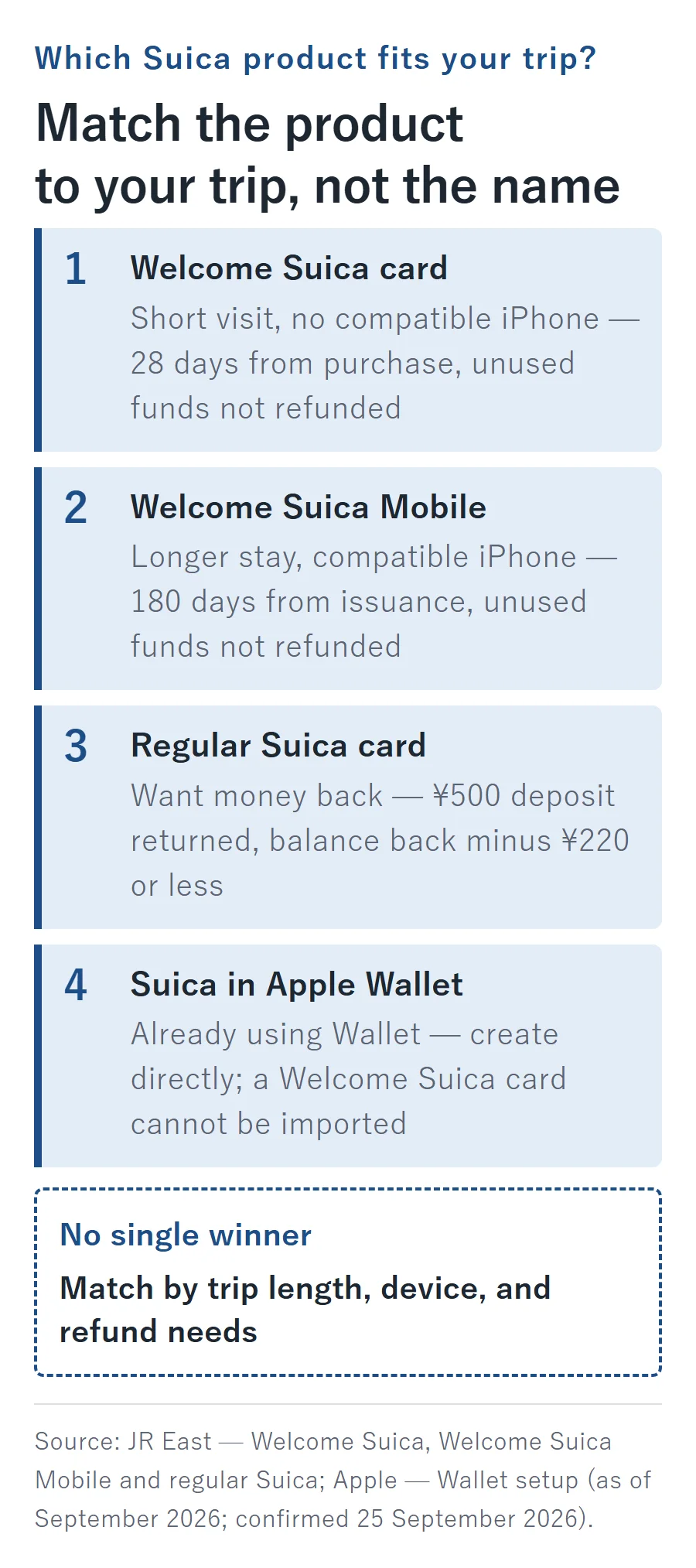
An IC card is a reloadable payment card for participating transport services and shops. The confusing part is not tapping it: products carrying the Suica name have different purchase, expiration and refund rules.
How do the four Suica options compare at a glance?
Separate the tourist card, tourist app, regular card and direct Wallet option. Moving from plastic to a phone does not simply preserve the same contract. The comparison below is as of September 2026; the Welcome Suica Mobile landing page dates its own information to March 2026.
| Option | Deposit | Lifetime | Unused money | How to obtain it |
|---|---|---|---|---|
| Welcome Suica card | None | 28 days; purchase day counts as day 1 | No routine refund | Listed counters and dedicated airport machines |
| Welcome Suica Mobile | None | 180 days, starting on issuance | No refund | App Store; compatible iPhone or Apple Watch |
| Regular Suica card | ¥500, refundable on return | Becomes invalid after 10 years without use | Refundable; deduction is ¥220 or the balance, whichever is smaller | not stated on the official page |
| Suica in Apple Wallet | None | not stated on the official page | not stated on the official page | Create directly in Wallet |
Source: JR East — Welcome Suica terms, regular Suica, Mobile, deposit announcement and Apple — Wallet setup (as of September 2026; confirmed 25 September 2026).
The unfilled details reflect gaps in the cited English material, not an invitation to substitute the physical card’s rules. In particular, do not assign regular Suica’s inactivity rule or refund calculation to Wallet just because both say Suica.
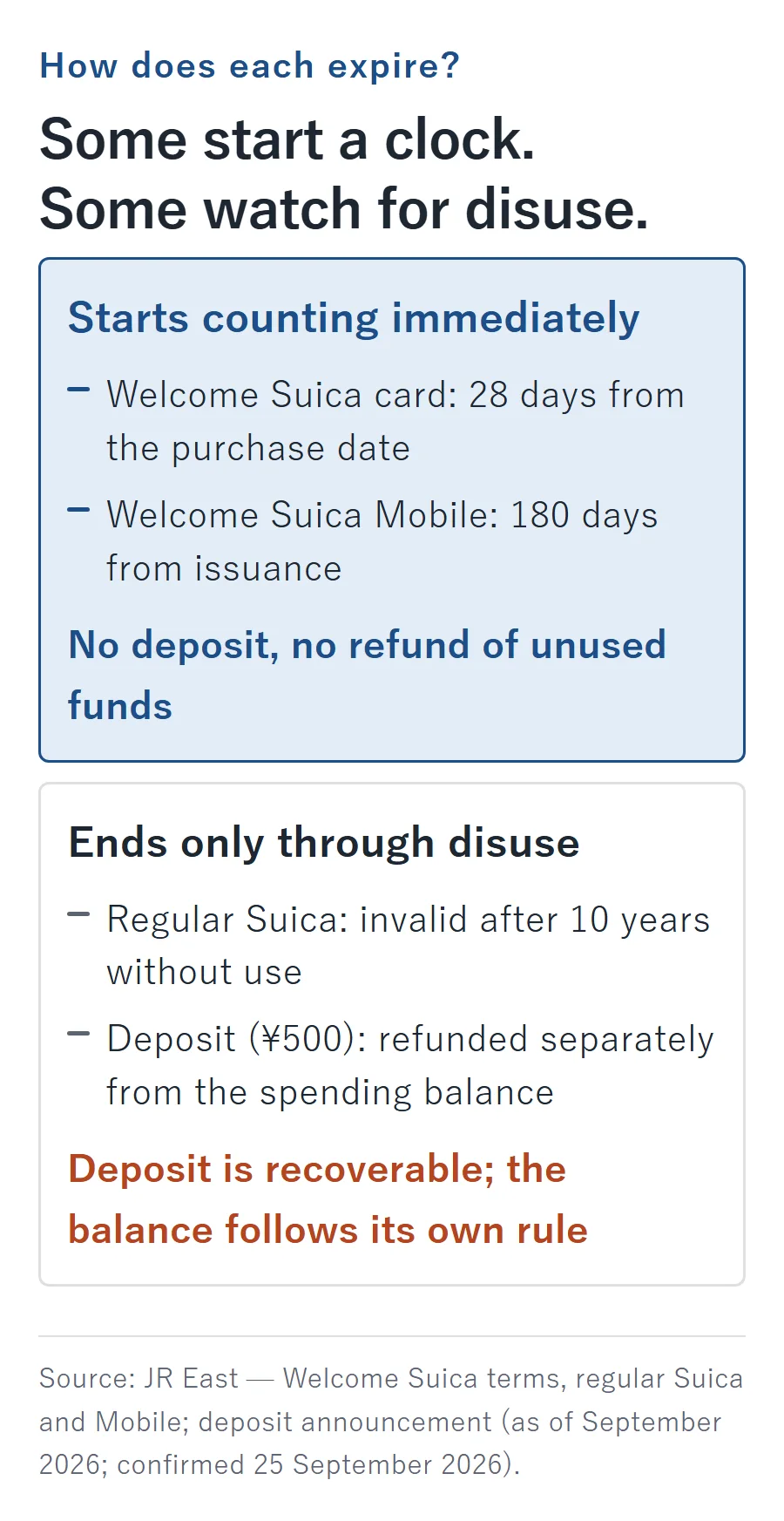
Where can you buy a Welcome Suica card, and when does it expire?
Use a specifically listed sales point, and count the purchase date as the beginning of its life. Buying early does not reserve a fresh period for when you eventually start riding.
Which airport and city locations sell it?
JR East’s list, as of September 2026, identifies dedicated Welcome Suica machines and JR EAST Travel Service Center counters at these airport stations:
- Narita Airport Terminal 1 Station.
- Narita Airport Terminal 2・3 Station.
- Haneda Airport Terminal 3 (Tokyo Monorail) Station.
City sales points are JR EAST Travel Service Centers at Shinjuku, Tokyo, Ikebukuro, Ueno, Shibuya, Yokohama and Sendai, plus JAPAN RAIL CAFÉ at Tokyo Station and TAKANAWA GATEWAY Travel Service Center. The list marks sales as temporarily halted at Kashiwa, Kawasaki, Tachikawa, Ōmiya, Funabashi, Fukushima and Niigata. In principle, purchases are limited to one card per person.
Source: JR East — Welcome Suica purchasing (as of September 2026; confirmed 25 September 2026).
Save the operator and counter name, not just “Haneda” or “Tokyo Station.” Revisit that official list before routing yourself through a sales point. For the rest of the airport plan, use the Japan luggage-forwarding guide to separate the suitcase arrangements from the station stop.
Which date should you trust?
The purchase day is day one of the 28-day allowance. As of September 2026, JR East puts the actual travel-validity dates on the Reference Paper issued with the card, not on the card itself. Carry that paper so you can show it when staff ask. The warning about the printed card wording is explicit:
“The GOOD THRU date is not the validity period.”
Source: JR East — Welcome Suica validity (as of September 2026; confirmed 25 September 2026).
Write the paper’s end date into your itinerary. If the trip continues beyond it, the issue is not whether you can add more money: you need a different payment plan for the remaining travel days.
How should you load money onto the card?
Use yen cash and add money in manageable amounts. As of September 2026, the card’s balance cannot exceed ¥20,000. Suitable station machines bearing the Welcome Suica mark and Seven Bank ATMs support loading; a credit card is not a loading method for this physical card. Ordinary refunds of leftovers are unavailable, and losing the card does not entitle you to a replacement.
Source: JR East — Welcome Suica loading and refunds (as of September 2026; confirmed 25 September 2026).
Do not confuse a deposit-free purchase with refundable spending money. The practical advantage is avoiding a deposit; the corresponding budgeting job is avoiding a large unused balance at departure.
What should families know about the child card?
Choose the child’s product separately from the adult’s phone setup. Under the Welcome Suica card rules as of September 2026, child eligibility continues through the first March 31 after the child’s 12th birthday; purchase requires the child’s identification, such as a passport.
Source: JR East — child Welcome Suica (as of September 2026; confirmed 25 September 2026).
That is a physical-card rule, not permission for a younger child to use the app. Settle which product each traveler needs before visiting the counter, and bring the child’s identification rather than assuming an adult’s passport answers the age question.
How should US visitors prepare for Welcome Suica Mobile?
Download the app before departure, but plan to issue the Suica after reaching Japan. In the official FAQ reviewed as of September 2026, the pre-arrival issuance list includes Australia, Malaysia, Singapore, South Korea, Taiwan and Vietnam, not the United States. The FAQ dates that list to March 6, 2025 and adds:
“It is subject to change.”
Source: JR East — Welcome Suica Mobile FAQ, No. 6945 (confirmed 25 September 2026).
That supports an arrival-day plan, not a permanent claim that issuance from the US is impossible. For countries outside the list, JR East directs travelers to reopen the app in Japan and enable location permission. Denying that permission prevents issuance, loading and ticket purchases.
Source: JR East — Mobile FAQ, Nos. 6945 and 6849 (as of September 2026; confirmed 25 September 2026).
Which devices qualify?
As of September 2026, Mobile’s listed requirements are iPhone XR/XS or newer with iOS 17.2 or newer, or Apple Watch Series 3 or newer; users must be at least 13. Its 180-day lifetime begins at issuance, and unused funds disappear at expiry rather than being refunded. The initial load must be at least ¥1,000; the balance ceiling is ¥20,000, with ¥10,000 per loading transaction.
Source: JR East — Mobile overview and FAQ, Nos. 6983, 6962 and 6964 (as of September 2026; confirmed 25 September 2026).
In-app funding uses an Apple Pay credit card held in your own name. Do not assume a US-issued card will work: JR East directs payment-card eligibility questions to the issuer. Cash alternatives include convenience-store staff, Seven Bank or Lawson Bank ATMs, and compatible tray-style loading machines. Not every private-railway, bus or store machine supports the app.
Source: JR East — Mobile FAQ, Nos. 6987, 7021 and 6917 (as of September 2026; confirmed 25 September 2026).
Welcome Suica Mobile is not an Android option as of September 2026. JR East’s Samsung project targets the first half of 2027, for Galaxy phones released from 2027 onward, with regions and models still undecided. Separately, Google’s Japanese e-money service requires Osaifu-Keitai support; having Google Wallet on an overseas Android phone does not establish Suica compatibility.
Source: JR East — Samsung announcement and Google — Japanese e-money requirements (as of September 2026; confirmed 25 September 2026).
Can the app handle reserved trains and Green Cars?
Yes, through separate ticket functions rather than treating every journey as an IC-balance deduction. As of September 2026, the app links with JR-EAST Train Reservation for reserved shinkansen and limited-express travel, including Narita Express and FUJI EXCURSION; that integration began in October 2025. Those reservations use credit-card payment rather than the Suica spending balance.
Source: JR East — Mobile ticket functions and integration timeline (as of September 2026; confirmed 25 September 2026).
For Green Cars on ordinary trains around Tokyo, Mobile’s Suica Green Ticket purchasing began March 1, 2026. Under the rules as of September 2026, those purchases use Apple Pay, cover only travel on the purchase day, and permit one person’s ticket per device.
Source: JR East — Suica Green Ticket announcement (as of September 2026; confirmed 25 September 2026).
For a family or group, distinguish buying a ticket for the phone’s user from arranging seats for the entire party. The Green Ticket device limit is part of that decision, not a reason to assume every reservation function has the same restriction.
Should you choose regular Suica or Suica in Apple Wallet?
Choose the physical regular card for its documented refund route; use direct Wallet setup to avoid buying plastic just to move it onto a phone. These are separate choices, not interchangeable versions of Welcome Suica Mobile.
Are regular cards still unavailable?
No: as confirmed in September 2026, sales of personalized Suica resumed September 1, 2024, and non-personalized Suica resumed March 1, 2025. The cited English Suica page does not identify current purchase stations or machines, so an airport sales list for Welcome Suica is not a regular-Suica shopping map.
Source: JR East — personalized-card restart and non-personalized-card restart (as of September 2026; confirmed 25 September 2026).
How do regular-card refunds work?
As of September 2026, regular Suica’s purchase amount includes a ¥500 deposit. On return, JR East deducts ¥220 from the spending balance, or takes that balance in full if it is smaller; the ¥500 deposit is returned in full. Its official examples give ¥1,280 back for a ¥1,000 balance, and ¥500 back for a ¥100 balance.
The issuer matters: JR East-issued cards are returned at JR East stations; cards issued by another company, such as Tokyo Monorail, must go to their issuer. Physical regular Suica uses cash loading, with a ¥20,000 balance ceiling. It becomes invalid after 10 years without use, though transfer of its funds to a new card or a refund remains possible afterward.
Source: JR East — regular Suica terms and refund examples (as of September 2026; confirmed 25 September 2026).
Put the return location into the departure plan before treating a refund as convenient. A deposit is recoverable money, but recovering it still means dealing with the right issuer.
Can you create Suica directly in Wallet or move a card into it?
Yes to direct creation; no to importing a Welcome Suica card. As of September 2026, Apple’s general setup route lists iPhone 8 or newer with current iOS, or Apple Watch Series 3 or newer, an Apple Account using two-factor authentication, and this payment requirement:
“An eligible payment card in Apple Wallet.”
Source: Apple — adding a Japanese transit card (as of September 2026; confirmed 25 September 2026).
Open Wallet, tap the add control, choose the transit-card category and Suica, then create a new card and choose the amount. Apple’s wording does not establish that every foreign-issued credit card qualifies.
An eligible adult regular Suica can instead be transferred. Its plastic card then stops working, and the deposit becomes spendable funds in Wallet rather than cash handed back. Welcome Suica is explicitly excluded from import, so buying that tourist card is not an intermediate step toward phone-based Suica.
Source: Apple — setup and transfer and JR East — import eligibility, FAQ No. 1400 (as of September 2026; confirmed 25 September 2026).
Keep internet access available for online top-ups; the Japan eSIM planning guide covers that connectivity need. The gate tap itself needs neither cellular service nor Wi-Fi, according to Apple. Losing a data connection and being unable to pay at a gate are not the same problem.
Source: Apple — using Japanese transit cards (confirmed 25 September 2026).
What about PASMO?
Look for TOURIST PASMO, not the discontinued PASMO PASSPORT. As of September 2026, PASMO’s tourist page lists a deposit-free card with 28 days starting on purchase, no refund of loaded money, and a purchase range of ¥1,000–¥10,000 depending on the seller.
Its listed airport outlets belong to Keikyu at Haneda and Keisei at Narita. At Haneda, the traveler-oriented machines accept credit cards for the purchase; later station-machine loading uses cash. Do not turn that purchase exception into a general promise of credit-card top-ups. Narita’s listed SKYLINER & KEISEI INFORMATION CENTER offer is ¥2,000.
Source: PASMO — TOURIST PASMO (as of September 2026; confirmed 25 September 2026).
PASMO PASSPORT sales ended in 2024. The successor’s announcement scheduled a May 2026 launch; the current tourist page provides the sales locations. Choose by the counter on your route and the refund terms, not by following an old airport-card recommendation.
Source: PASMO — successor announcement (as of September 2026; confirmed 25 September 2026).
Why can’t you ride across IC areas with a single tap-in journey?
Acceptance in several regions does not make those regions one continuous fare area. A card can serve participating local transport in different regions while still being unsuitable for a journey across their boundary.
JR East’s examples include Odawara to Shizuoka, crossing from the Suica area into the TOICA area. Buy the appropriate ticket beforehand rather than assuming the destination gate will settle the trip. If you have already ridden beyond the area, speak to destination-station staff and settle in cash.
Source: JR East — IC interoperability FAQ and Welcome Suica coverage (as of September 2026; confirmed 25 September 2026).
Special train products are a separate question. Welcome Suica Mobile supports payment from its stored funds for unreserved seats on JR East-area shinkansen without additional enrollment. That specific app feature is not permission to tap through any interregional journey with any Suica, or a substitute for the ticket needed for a reserved seat.
Source: JR East — Welcome Suica Mobile launch details (as of September 2026; confirmed 25 September 2026).
Which choice fits your trip?
Eliminate the options that fail your dates or device requirements before comparing convenience. Use this sequence rather than treating the tourist branding as the deciding factor.
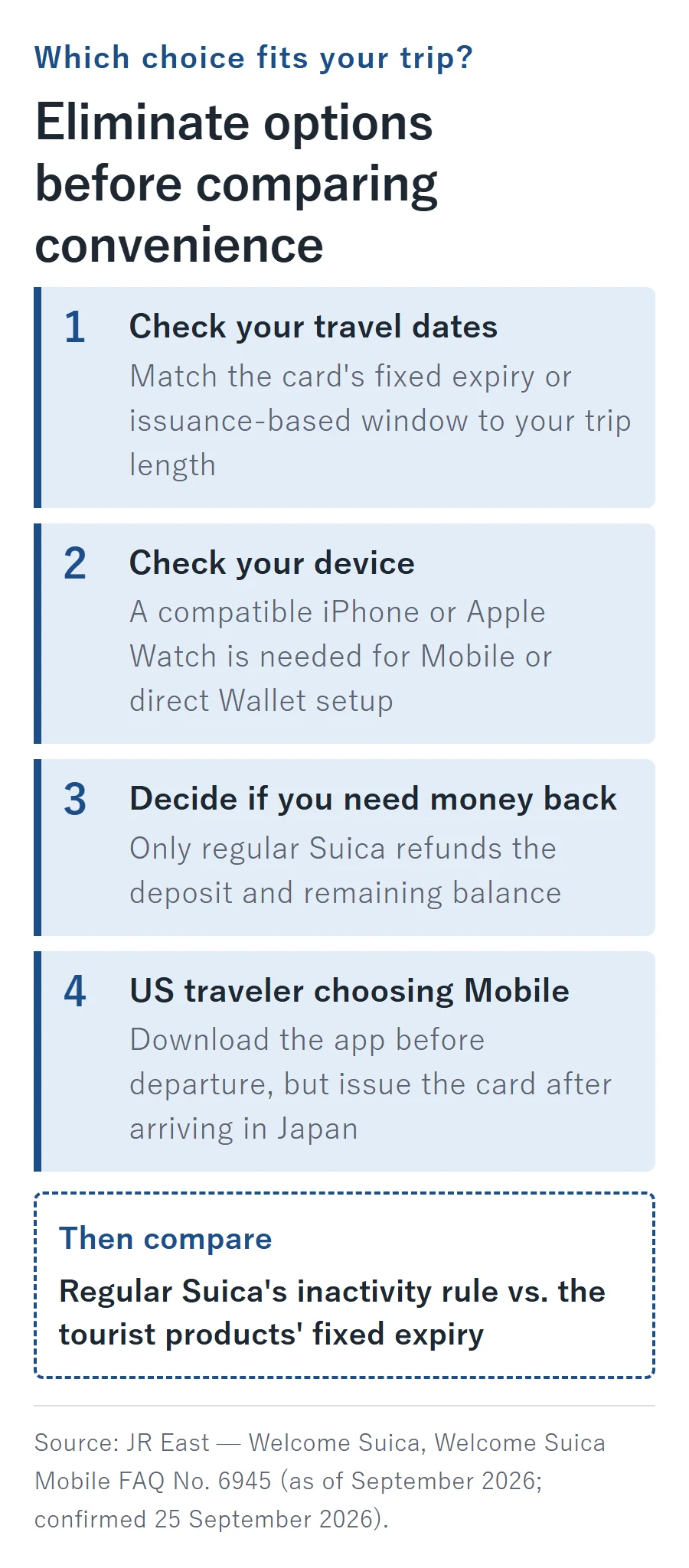
- Short visit, no compatible iPhone: choose a physical Welcome Suica if leaving unused funds behind is acceptable; compare regular Suica when a refund matters.
- Longer visit with a compatible iPhone: choose Welcome Suica Mobile when its issuance-based lifetime covers the itinerary and non-refundability is acceptable.
- Return-trip traveler: compare regular Suica’s inactivity rule with the tourist products’ fixed expiration dates.
- US traveler choosing Mobile: separate downloading the app from issuing the card, and leave issuance in the arrival plan.
- iPhone traveler who prefers Wallet: create Suica directly rather than buying an incompatible tourist card to import.
For the separate connection decision, use the pocket WiFi versus eSIM guide. Choosing internet service does not establish transit-card compatibility, and choosing a transit card does not arrange your internet connection.
FAQ
What if you lose the Welcome Suica Reference Paper?
JR East provides a reprint option on automatic and multifunction ticket machines within the Suica area. Use the machine’s Reference Paper reprint function; this replaces the paperwork, not a lost card.
Source: JR East — Reference Paper (as of September 2026; confirmed 25 September 2026).
Can you buy the longer-life physical Welcome Suica at a travel center?
No: as of September 2026, the separate Welcome Suica (long-term use), lasting up to six months after issuance, is restricted to bulk purchases. It is not an individual travel-center alternative to the standard tourist card.
Source: JR East — long-term Welcome Suica (confirmed 25 September 2026).
Why can a late-night Welcome Suica Mobile top-up fail?
As of September 2026, the app’s maintenance window for registration, loading and device transfers is 02:00–04:00 Japan time. Plan loading outside that window rather than immediately treating the failure as proof that your payment card is incompatible.
Source: JR East — Mobile FAQ, No. 6807 (confirmed 25 September 2026).
What if the physical Welcome Suica itself malfunctions?
JR East’s defect-refund exception requires the readable 17-digit identifier beginning JE to establish the balance. As of September 2026, collection starts the day after applying and ends 14 days after expiry, at a JR East Ticket Office (Midori-no-madoguchi) within the Suica area. An unreadable identifier prevents that refund; this is not a remedy for losing the card.
Source: JR East — defective Welcome Suica refunds (confirmed 25 September 2026).
What to remember
Choose by travel dates, device compatibility and whether you need unused money back.
US travelers should plan Welcome Suica Mobile issuance after arrival; a Welcome Suica card cannot be imported into Wallet.
Treat sales counters, card expiry and travel across IC-area boundaries as separate planning checks.